Luminance (in)stability in OLED monitors: Difference between revisions
No edit summary |
No edit summary |
||
| Line 88: | Line 88: | ||
{{clr}} | {{clr}} | ||
=== | === Best-case luminance stability === | ||
Test: ''BgVar+TgtMaxSmall''. | Test: ''BgVar+TgtMaxSmall''. | ||
Whereas the previous test was about the best-case scenario, this test is more about the worst-case scenario. How is the target stimulus luminance modulated by the background pattern and average luminance? The effect of the background on the target luminance might not only be a result of different average luminances but also where on the screen, with respect of the target position, either dark or bright regions are presented. There are many potential factors at play, but the goal is not to identify and isolate them but to create a worst-case scenario, which gives each of these factors a fair chance to come into effect. This is done by presenting different patterns (see <xr id="BgPatterns" nolink/>) in random order and for random duration, all the while the target stimulus at the screen center remains the same. Importantly, this includes scenarios where the average luminance will change a lot within a short time, allowing for potential settling effects of the monitor's control circuit to surface. In fact, the pattern sequence includes more full black and full white screens than other patterns for making more extreme changes in the average luminance more likely. | |||
<xr id="VarBgOLED" nolink/> (and <xr id="VarBgOLEDzoomed" nolink/> for a zoomed-in version) shows the traces for the OLED monitors. | <xr id="VarBgOLED" nolink/> (and <xr id="VarBgOLEDzoomed" nolink/> for a zoomed-in version) shows the traces for the OLED monitors. | ||
| Line 108: | Line 108: | ||
There is little low/high correspondence between the traces of the different monitors to begin with, but the ASUS QD-OLED in particular exhibits a pronounced settling behavior whenever the relative luminance error (and, thus, the luminance) changes from a higher to a lower level, which becomes clearer when zooming in (see <xr id="VarBgOLEDzoomed" nolink/>). That is, the settling behavior is even uni-directional. Whatever the explanation might be, this is not specific to QD-OLED technology, because the MSI QD-OLED monitor does not show this behavior at all. | There is little low/high correspondence between the traces of the different monitors to begin with, but the ASUS QD-OLED in particular exhibits a pronounced settling behavior whenever the relative luminance error (and, thus, the luminance) changes from a higher to a lower level, which becomes clearer when zooming in (see <xr id="VarBgOLEDzoomed" nolink/>). That is, the settling behavior is even uni-directional. Whatever the explanation might be, this is not specific to QD-OLED technology, because the MSI QD-OLED monitor does not show this behavior at all. | ||
<xr id=" | <xr id="VarBgNonOLED" nolink/>) shows that the patterns of non-OLED monitors look rather similar, albeit at mostly lower error levels. That the patterns look similar does not necessarily mean that they are caused by the same mechanism. At least for the non-OLED monitors, it seems very unlikely that the observed luminance modulation is reflecting a modulation of the LED backlight these monitors rely on, which operate very independently of the image content. Although this is very different in OLED monitors, as explained in the introduction, it is just an assumption that the luminance modulation observed for OLED monitors is dominantly caused by the overall OLED current control circuit which, in turn, is affected by the average image luminance. To isolate average luminance effects from background pattern effects, the next test is better suited. | ||
<br/><figure id=" | <br/><figure id="VarBgNonOLED" noblock> | ||
[[File: | [[File:LumStab_VarBgNonOledTraces.png|link={{filepath:LumStab_VarBgNonOledTraces.png}}|center|thumb|800px|<caption>Drift-corrected traces of luminance error in the variable background test ''BgVar+TgtMaxSmall''for the non-OLED monitors. Notice the different Y axis scaling for the TN monitor (BenQ XL2540, first monitor shown here).</caption>]] | ||
</figure> | </figure> | ||
=== Effect of average luminance === | === Effect of average luminance === | ||
Test: ''BgRamp+TgtSmallWhite''. | |||
This test probes the monitor's behavior for different average luminances without potentially contaminating the results by additional background pattern effects as is the case with the previous ''BgVar+TgtMaxSmall'' test. Moreover, this test covers the range of average luminance exhaustively, which can reveal different operating regimes of the monitor's control circuit. To do so, the entire background (excluding the target region) is slowly changed from black to full white and back. Having both, the up-ramp and the down-ramp, allows to see potentially interesting symmetry effects. Note that the measured target is a full white stimulus, which might be considered the best-case scenario as far as relative luminance errors go. | |||
br/><figure id="RampBgOLED" noblock> | |||
[[File:LumStab_RampBgOledTraces.png|link={{filepath:LumStab_RampBgOledTraces.png}}|center|thumb|800px|<caption>Traces of luminance error in the ramped background test ''BgRamp+TgtSmallWhite'' for the OLED monitors. Notice the different Y axis scalings.</caption>]] | |||
</figure> | |||
<xr id="RampBgOLED" nolink/> shows the traces for the OLED monitors. The W-OLED monitor stands out positively, as it shows a smooth modulation similar to the non-OLED monitors albeit at a somewhat higher error level (see <xr id="RampBgNonOLED" nolink/>). The ASUS QD-OLED is the worst, although mostly because of the behavior at average luminances below ≈40% (which corresponds to 40{{cd_m2}} under the test conditions used here. The behavior of the MSI monitor seems not as reproducible as for the other monitors, neither absolutely nor in terns of symmetry between the up- and the down-ramps. This might indicate a high susceptibility to temperature fluctuations. However, this effect is not dominating the behavior, and the errors are still smaller than for the ASUS QD-OLED monitor. | |||
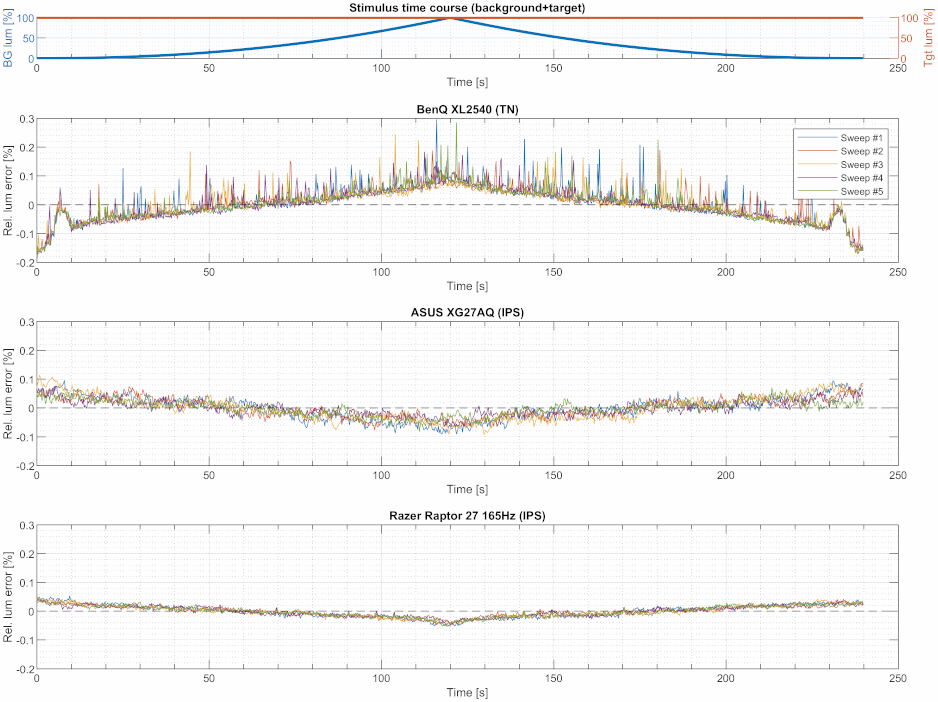
Also the non-OLED monitors show a modulation with the background luminance (<xr id="RampBgNonOLED" nolink/>), although this modulation might originate from more local interactions between target and background regions rather than overall average luminance. If such interaction exists, it is likely modulated by the local background luminance levels rather than some overall background luminance. But, in the end, this is just speculation. The TN monitor stands out because of the spiky curves. Moreover, the curves are upside-down when compared to the other monitors. | |||
br/><figure id="RampBgNonOLED" noblock> | |||
[[File:LumStab_RampBgNonOledTraces.png|link={{filepath:LumStab_RampBgNonOledTraces.png}}|center|thumb|800px|<caption>Traces of luminance error in the ramped background test ''BgRamp+TgtSmallWhite'' for the OLED monitors. Notice the different Y axis scalings.</caption>]] | |||
</figure> | |||
Revision as of 18:04, 20 June 2026
Topic
It is well known that OLED monitors down-regulate image luminance if, otherwise, the average image luminance would exceed a limit that cannot be handled by the monitor on the long run. However, luminance variation due to this luminance limitation control is not what shall be discussed here. Instead, this page is about luminance stability when the monitor is not only set to the "uniform brightness" mode but also operated well below the maximum luminance specified for the uniform brightness mode. One major difference between LCD and OLED technology is that, in LCD monitors, the light comes from a constant backlight and the pixel cells just control how much of the backlight can pass, whereas in OLED monitors, the light is directly generated by the pixels – on demand, so to speak. Assuming that the bulk of the monitor's energy consumption is spent on the pixels' luminous output, the energy demand in LCD monitors is rather constant and much easier to control than in OLED monitors, where energy demand is tightly coupled to the image content and can rapidly change from one image frame to the next. Moreover, this control of the overall OLED current not only has to be fast but also very accurate, given that there is no cancelling out of errors through averaging across the OLED pixels – that is, a 1% error in the overall current directly results in a 1% pixel luminance error for each single pixel. The practical relevance of potentially unstable pixel luminance totally depends on the application, e.g. how fast and to what extent the (intended) image luminance is changing, and how stable the luminance of a potential target stimulus has to be.
Luminance measurement method
Luminance measurements were taken using a photodiode (OSRAM SFH2240-A01, photo-sensitive area: 2.65x2.65 mm) which was connected to a micro-controller (RaspberryPi RP2350) via a trans-impedance amplifier. All the electronics was USB-bus powered, albeit through linear voltage regulators. The RP2350 offers a 12bit analog-digital converter, which was operated at 480 ksps. However, data was down-sampled to 16bit at 20 kHz before making it available to the PC. The photodiode, which was housed in a small enclosure together with the other electronics, was placed over a 5x5 mm target stimulus at the screen center, at a distance of about 2.5 mm from the screen surface.
Although the used photodiode is somewhat Vλ-corrected, this correction is far from perfect. Moreover, the setup did not include an optical lens which would have restricted the otherwise relatively wide angular reception profile, which makes the setup more sensitive to different angular emission characteristics of different monitor technologies (e.g., TN vs. OLED). Therefore, the measured signal amplitude for a calibrated D65 white of 100 cd/m2 still depended on the monitor under test. The signal amplitude for the 5x5 mm target was between 23%FSR and 33%FSR, while being about 30% higher for the big target.
A thin foam rubber layer applied to the enclosure's surface, surrounding the enclosure's photodiode cutout, reliably shadowed ambient light. Moreover, the target stimulus was always placed on a black 35x35 mm square for preventing light emitted by the global background pattern from bleeding into the target area through the mechanical screen structures covering the pixels.
The stimulus presentation and final luminance sampling followed a 4 Hz clock. In essence, each 4 Hz sampling cycle started with updating the screen image buffer, whether the image content actually changed or not. Photodiode samples that happened to fall in this sampling cycle were averaged, ignoring samples that could be potentially contaminated by the content of the previous or the next image, assuming an image settling time that depended on the monitor technology (e.g., a generous 10 ms for OLED monitors, or 40 ms for the (fast) TN and IPS monitors).
Side note: Originally, an industrial camera (IDS UI-3360CP-NIR, 2048x1088 pixels, 2/3" monochrome CMOS sensor) was used for taking luminance measurements, with the 5x5 mm target stimulus filling an ROI of 1024x1024 camera pixels. However, the measurement noise with this setup was about one order of magnitude worse than with the photodiode.
Test stimuli
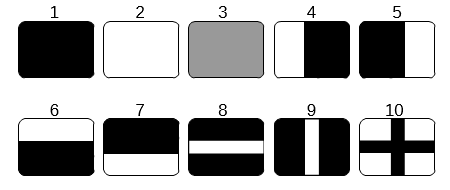
There were several tests, each with its specific stimulus configuration comprising of a measured target at the screen center and the background covering the rest of the screen. In principle, the measured target was either small or big (5x5 or 35x35 mm), and its luminance could be constant over time or changing. The background either changed between different static patterns (see Figure 1), or it was just all black or all mid-gray throughout, or it was slowly ramped up from black to white and then back down from white to black.
Test protocol
The entire test sequence was run automatically, but the single tests were otherwise independent. Before each test, a quick gamma curve was measured, basically for inferring the pixel values that needed to be programmed for specific luminance levels.
For each of the 6 tests, 5 repetitions of 2 to 4 minute long sweeps were measured. The stimulus sequence within a sweep, even if randomized, was exactly the same for all sweep repetitions (and for all monitors). For example, if the background was changed randomly from time to time, this random sequence of background patterns and the duration of each pattern was kept the same for all sweeps for all monitors. Before each sweep, a black screen was presented for 10 seconds, which was supposed to somewhat reset the state of the screen pixels and monitor control electronics. For a single monitor, the data collection took about 95 minutes.
Analysis
Very slow luminance changes are not of interest here, which is why luminance drift was removed from each sweep. The drift was modeled by a smoothing quadratic spline with support points about every 60 s. For 2-minute sweeps, for example, this resulted in 4 coefficients per sweep, which included the coefficients for the spline boundary conditions at the sweep start and end. Because such drift model is too flexible for preserving systematic luminance changes which are of interest in the BgRamp+TgtSmallWhite test (see below), the spline-based drift model was replaced by a simple linear drift model for this particular test.
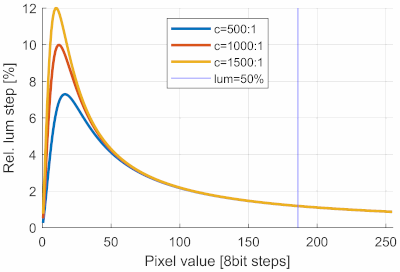
The blue vertical line indicates where the luminance reaches 50% of the maximum luminance. All tests use target luminances higher than 50%, where the relative luminance step sizes are about 1% and are essentially independent of the monitor's white contrast.
Also of no interest are the absolute luminance levels, which is why the luminance error is expressed as relative luminance error, i.e., the difference between the measured and the expected luminance, divided by the expected luminance. The expected luminance was defined as the average luminance across all measurements taken within a sweep for the respective target luminance. This definition of relative luminance error closely reflects what is also perceptually relevant; a 1% relative luminance error is perceptually as large in dark stimuli as in bright stimuli, even though the corresponding absolute luminance errors differ.
For the quantitative evaluation of the observed relative luminance error values, a comparison with the relative luminance step size following a gamma transfer function might be useful. Unfortunately, the step sizes depend on the assumed gamma value, white-contrast, and specific pixel value. Figure 1 shows curves for gamma=2.2 and three different contrast levels. For the test described here, which mostly use a 100%-white target or at least a target with a luminance above 50% of maximum white, an 8 bit step corresponds to a relative step size of roundabout 1%. A uniform distribution of an according luminance error would have an SD of 1%/sqrt(12) ≈ 0.3%. This means that, at least for higher pixel values, the relative luminance error resulting just from the 8 bit quantization is 0.3%. However, this a very theoretical value and does not include the additional round-off noise introduced by the color processing in the monitor.
Results overview
| Bg0 + TgtMaxSmall |
BgMid + TgtMaxSmall |
BgVar + TgtMaxSmall |
BgRamp + TgtMaxSmall |
Bg0 + TgtVarSmall |
Bg0 + TgtVarBig | |
|---|---|---|---|---|---|---|
| BenQ XL2540 (TN) |
0.065% (±0.0047) |
0.077% (±0.0038) |
0.13% (±0.0013) |
0.086% (±0.0093) |
0.068% (±0.0022) |
0.070% (±0.0063) |
| ASUS XG27AQ (IPS) |
0.014% (±0.00055) |
0.015% (±0.00052) |
0.050% (±0.00026) |
0.034% (±0.0032) |
0.015% (±0.00044) |
0.015% (±0.00046) |
| Razer Raptor 27 165Hz (IPS) |
0.0054% (±0.00020) |
0.0059% (±0.00028) |
0.041% (±0.000068) |
0.019% (±0.00064) |
0.011% (±0.00019) |
0.011% (±0.00029) |
| ASUS PG27AQDP (W-OLED) |
0.018% (±0.00054) |
0.019% (±0.00033) |
0.17% (±0.0014) |
0.11% (±0.0027) |
0.025% (±0.00058) |
0.024% (±0.0016) |
| ASUS PG27UCDM (QD-OLED) |
0.062% (±0.0089) |
0.043% (±0.0028) |
1.7% (±0.011) |
2.5% (±0.0068) |
0.081% (±0.0046) |
0.100% (±0.012) |
| MSI 271QRX (QD-OLED) |
0.055% (±0.010) |
0.061% (±0.0086) |
0.29% (±0.0019) |
0.29% (±0.0035) |
0.072% (±0.0069) |
0.072% (±0.0069) |
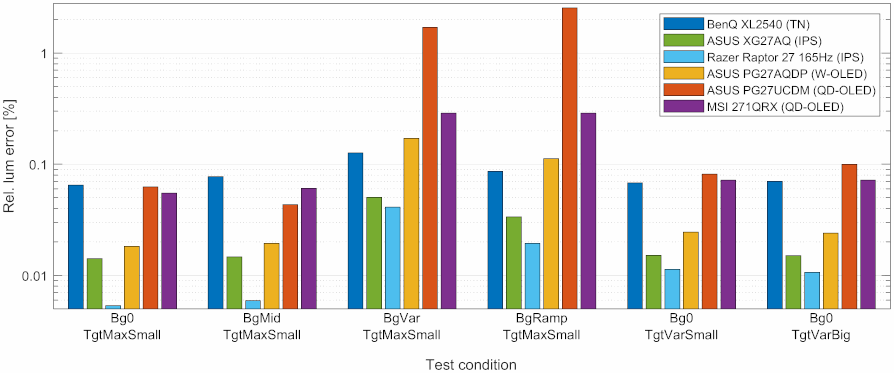
Table 1 and Figure 3 show the relative luminance errors in terms of standard deviations (SDs) for the test conditions explained further below. Note that for the MSI 271QRX monitor (violet bars) the small target was actually always replaced by the big target, which – the big target – was otherwise used only in the last test condition (Bg0+TgtVarBig). This was necessary, because the pixel shift (OLED care option) could not be disabled for this monitor and prevented measuring the small target with sufficient consistency. The TN and an IPS monitors were mainly included for reference, whereas the main focus lies on the comparison of the three OLED monitors, specifically the difference between W-OLED and QD-OLED.
Questions of interest (test descriptions)
Best-case luminance stability
Test: Bg0+TgtMaxSmall and BgMid+TgtMaxSmall.
Obviously, the screen image should remain completely unchanged for this test. One cannot be sure though whether a black background is really optimal here, because with a basically all black screen, the monitor's control circuit is operating at the lower boundary of its operating range, where the circuit might be working less optimal than further away from the boundaries. Therefore, a mid-gray background might be more favorable.
The Razer monitor shows, with relErr=0.0054% in the BgMid+TgtMaxSmall condition, the best result, obviously also providing an upper limit for the photodiode measurement noise, at least for this luminance level, i.e., at 100 cd/m2. Further measurements not shown here suggest that this value might reflect, at least to some relevant extent, photodiode measurement noise rather than monitor luminance noise. Anyway, given that all other results are much higher than relErr=0.005%, those results are not affected by measurement noise.
The very different performance of the two IPS monitors (Razer with 0.0054% vs. ASUS with 0.014% – almost a factor of 3) shows how much the particular implementation can play a role. In this case, even the panels come from different manufacturers (Innolux vs. AUO).
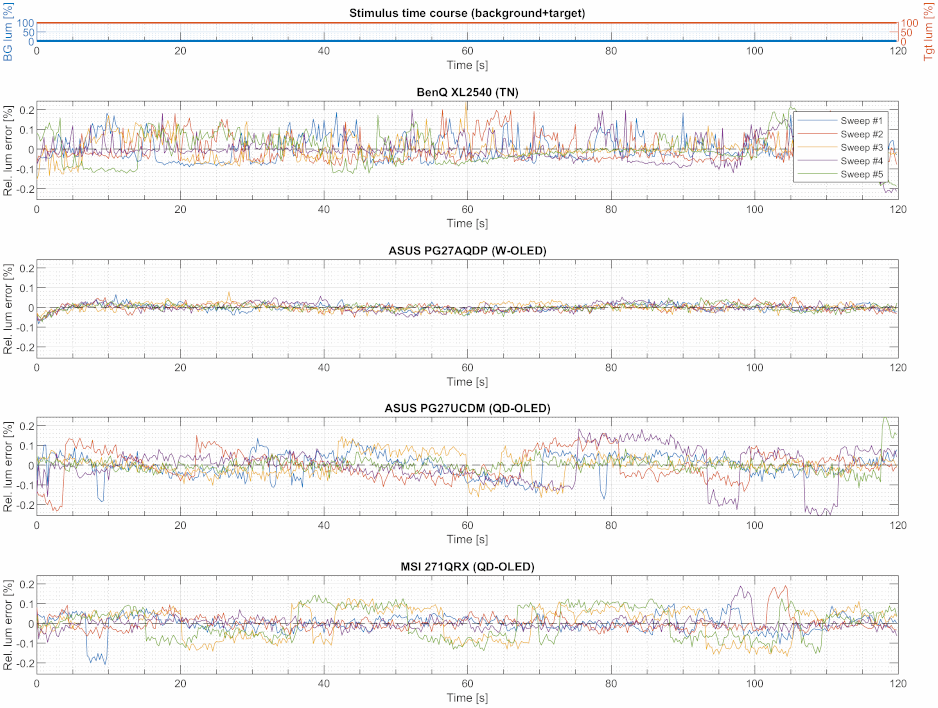
It is noteworthy that the major part of the noise exhibited by the worst-performing monitors (i.e., the TN and both QD-OLED monitors) originates from low-frequency step-wise changes, especially for the two QD-OLED monitors (see Figure 4).
Best-case luminance stability
Test: BgVar+TgtMaxSmall.
Whereas the previous test was about the best-case scenario, this test is more about the worst-case scenario. How is the target stimulus luminance modulated by the background pattern and average luminance? The effect of the background on the target luminance might not only be a result of different average luminances but also where on the screen, with respect of the target position, either dark or bright regions are presented. There are many potential factors at play, but the goal is not to identify and isolate them but to create a worst-case scenario, which gives each of these factors a fair chance to come into effect. This is done by presenting different patterns (see Figure 1) in random order and for random duration, all the while the target stimulus at the screen center remains the same. Importantly, this includes scenarios where the average luminance will change a lot within a short time, allowing for potential settling effects of the monitor's control circuit to surface. In fact, the pattern sequence includes more full black and full white screens than other patterns for making more extreme changes in the average luminance more likely.
Figure 5 (and Figure 6 for a zoomed-in version) shows the traces for the OLED monitors.
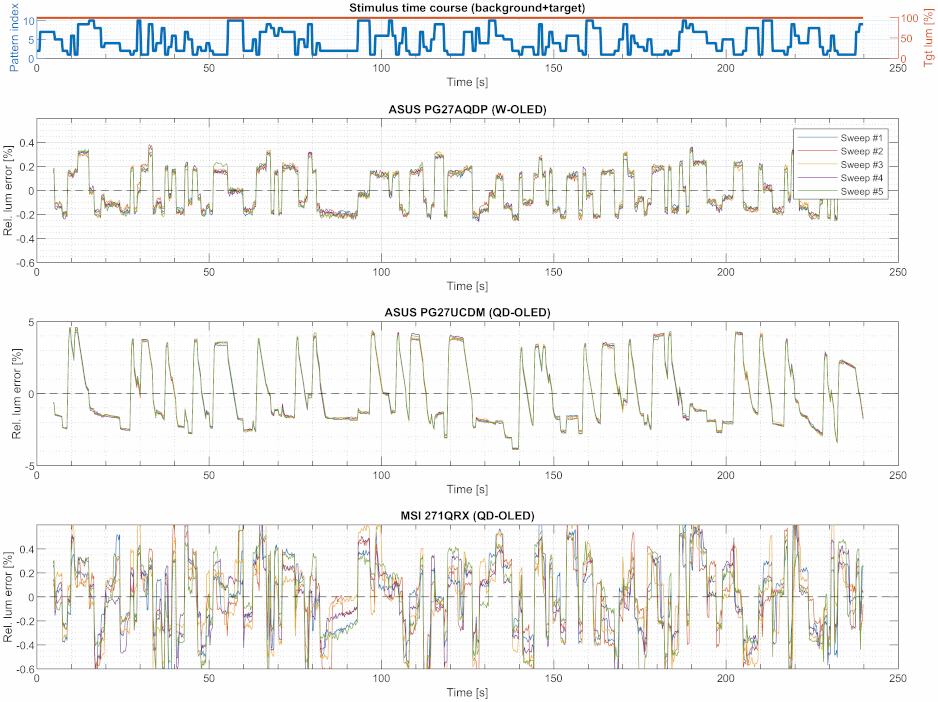
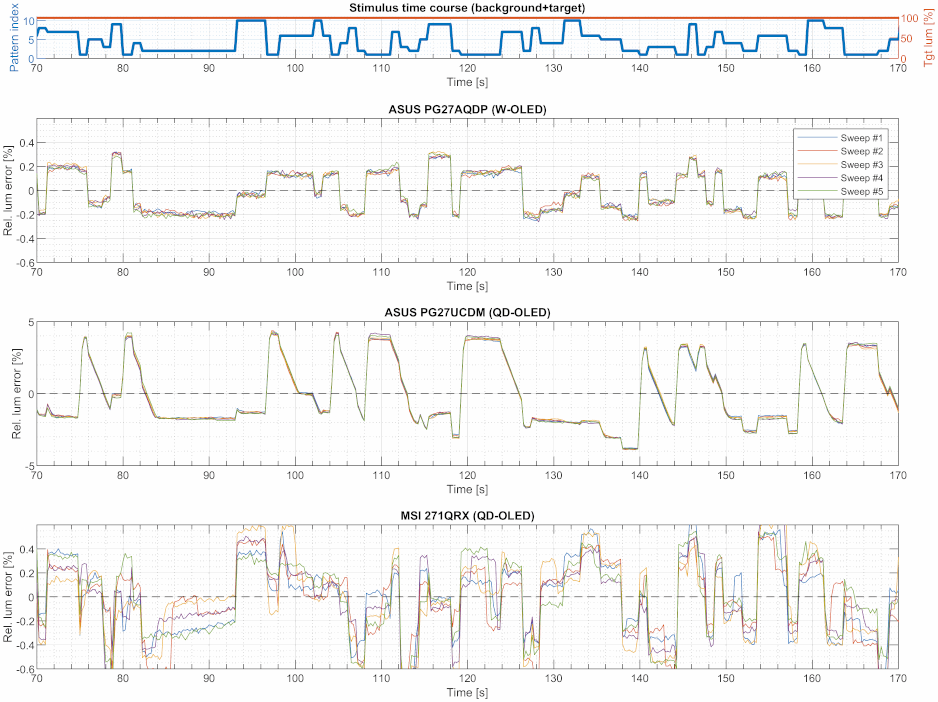
Notice the different Y axes scalings, which differ by an order of magnitude. This is how far off the ASUS QD-OLED is in this test compared to the other two OLED monitors. Also notice that the stimulus time course for the background (blue curve in the first panel) indicates the background pattern and not the background pattern's luminance (at least not directly). Therefore, there is no obvious low/high correspondence expected between the blue curve and the traces. For judging the magnitude of the Y values, be reminded that a 8 bit step corresponds to a relative step size of roundabout 1%, meaning that, for the ASUS QD-OLED monitor, the dominant modulation amplitude is in the order of several 8 bit steps – not great!
There is little low/high correspondence between the traces of the different monitors to begin with, but the ASUS QD-OLED in particular exhibits a pronounced settling behavior whenever the relative luminance error (and, thus, the luminance) changes from a higher to a lower level, which becomes clearer when zooming in (see Figure 6). That is, the settling behavior is even uni-directional. Whatever the explanation might be, this is not specific to QD-OLED technology, because the MSI QD-OLED monitor does not show this behavior at all.
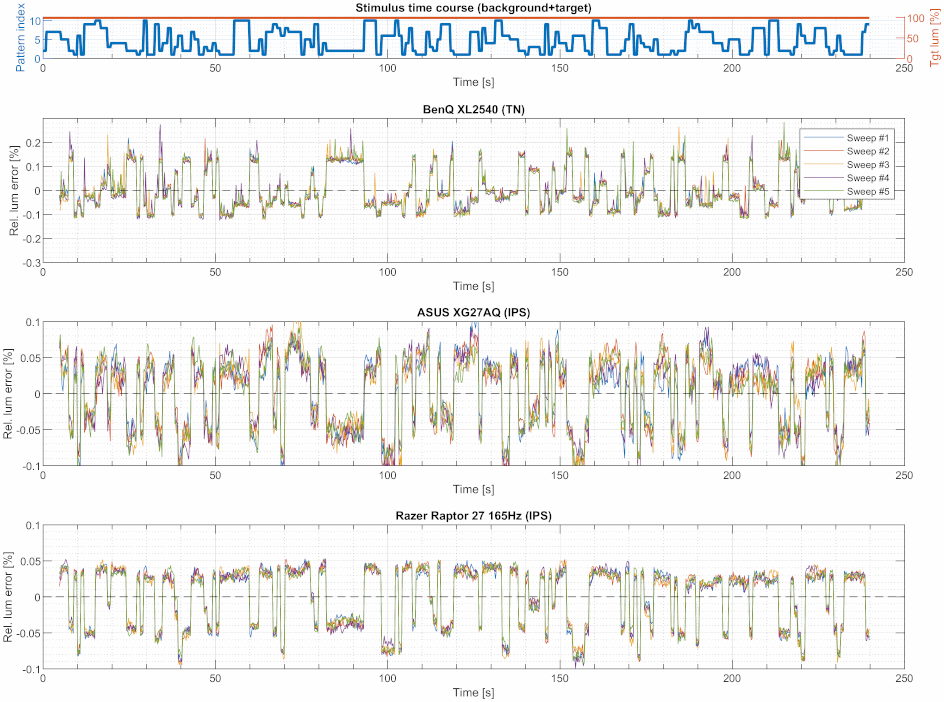
Figure 7) shows that the patterns of non-OLED monitors look rather similar, albeit at mostly lower error levels. That the patterns look similar does not necessarily mean that they are caused by the same mechanism. At least for the non-OLED monitors, it seems very unlikely that the observed luminance modulation is reflecting a modulation of the LED backlight these monitors rely on, which operate very independently of the image content. Although this is very different in OLED monitors, as explained in the introduction, it is just an assumption that the luminance modulation observed for OLED monitors is dominantly caused by the overall OLED current control circuit which, in turn, is affected by the average image luminance. To isolate average luminance effects from background pattern effects, the next test is better suited.
Effect of average luminance
Test: BgRamp+TgtSmallWhite.
This test probes the monitor's behavior for different average luminances without potentially contaminating the results by additional background pattern effects as is the case with the previous BgVar+TgtMaxSmall test. Moreover, this test covers the range of average luminance exhaustively, which can reveal different operating regimes of the monitor's control circuit. To do so, the entire background (excluding the target region) is slowly changed from black to full white and back. Having both, the up-ramp and the down-ramp, allows to see potentially interesting symmetry effects. Note that the measured target is a full white stimulus, which might be considered the best-case scenario as far as relative luminance errors go.
br/>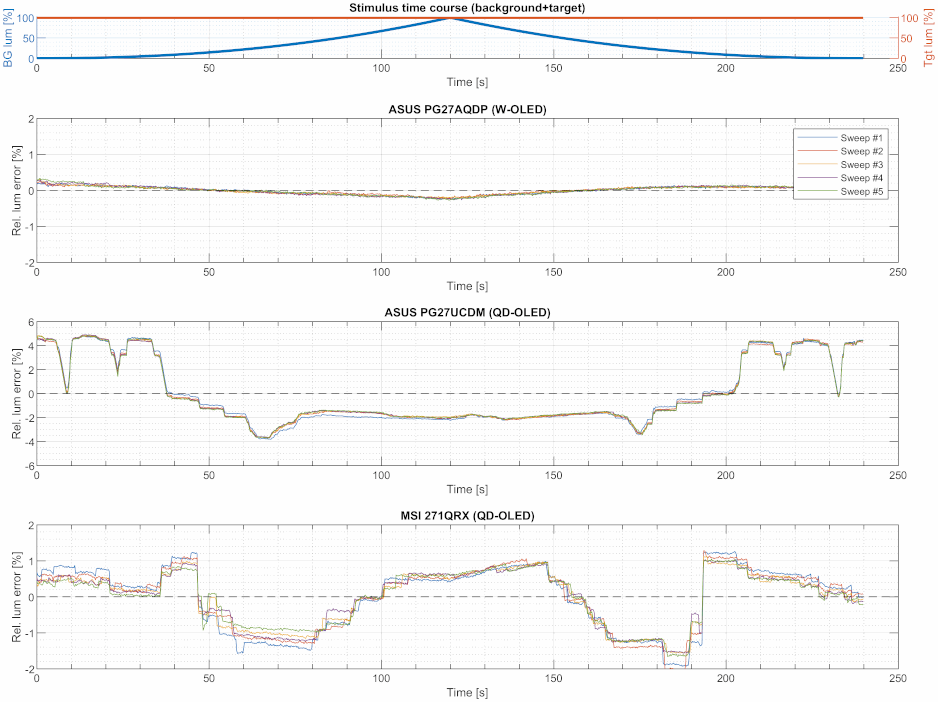
Figure 8 shows the traces for the OLED monitors. The W-OLED monitor stands out positively, as it shows a smooth modulation similar to the non-OLED monitors albeit at a somewhat higher error level (see Figure 9). The ASUS QD-OLED is the worst, although mostly because of the behavior at average luminances below ≈40% (which corresponds to 40 cd/m2 under the test conditions used here. The behavior of the MSI monitor seems not as reproducible as for the other monitors, neither absolutely nor in terns of symmetry between the up- and the down-ramps. This might indicate a high susceptibility to temperature fluctuations. However, this effect is not dominating the behavior, and the errors are still smaller than for the ASUS QD-OLED monitor.
Also the non-OLED monitors show a modulation with the background luminance (Figure 9), although this modulation might originate from more local interactions between target and background regions rather than overall average luminance. If such interaction exists, it is likely modulated by the local background luminance levels rather than some overall background luminance. But, in the end, this is just speculation. The TN monitor stands out because of the spiky curves. Moreover, the curves are upside-down when compared to the other monitors.
br/>